Hallo,
Als je net als ik het zat wordt iedere keer je SD-card uit het Elektor Embedded-Linux-Board te moeten halen als je een file wilt hebben op je board, dan is het de moeite waard dit rechtstreeks via picocom of minicom te doen. Ik kwam het volgende tegen en dit heb ik nu aan de praat.
http://sigusch.com/jf_knowhow/t59-p191s422-s191s422.php
Het volgende dat ik zou willen is Eclipse te installeren in de VMware player en dit ook rechtstreeks laten werken met het boardje. Zoiets als http://www.youtube.com/watch?v=vFv_-ykLppo

Het Elektor forum gaat sluiten. Zie ook deze link. Vanaf vrijdag 1 maart is het niet langer mogelijk om in te loggen op het forum. Wel blijft de inhoud van het forum nog zichtbaar tot het einde van de maand maart. Per 1 april gaat het forum definitief uit de lucht.
Send & Receive data
8 posts
• Page 1 of 1
 by mrich » Tue Oct 02, 2012 12:00 am
ikke ook! ikke ook! 
Alleen gaat mijn learning curve' momenteel zo stijl dat ik een beetje hoogtevrees krijg..... zoveel nieuwe interessante dingen....maar kost veel tijd om er in te duiken.....
Maar we houden vol! Dat Eclipse ziet er ook alweer interessant uit en lijkt het e.e.a. uiteindelijk een stukje makkelijker te maken voor wat betreft de uitvoering... Ga ik ook eens in duiken...
Alleen gaat mijn learning curve' momenteel zo stijl dat ik een beetje hoogtevrees krijg..... zoveel nieuwe interessante dingen....maar kost veel tijd om er in te duiken.....
Maar we houden vol! Dat Eclipse ziet er ook alweer interessant uit en lijkt het e.e.a. uiteindelijk een stukje makkelijker te maken voor wat betreft de uitvoering... Ga ik ook eens in duiken...
Cas55Hallo,
Als je net als ik het zat wordt iedere keer je SD-card uit het Elektor Embedded-Linux-Board te moeten halen als je een file wilt hebben op je board, dan is het de moeite waard dit rechtstreeks via picocom of minicom te doen. Ik kwam het volgende tegen en dit heb ik nu aan de praat.
http://sigusch.com/jf_knowhow/t59-p191s422-s191s422.php
Het volgende dat ik zou willen is Eclipse te installeren in de VMware player en dit ook rechtstreeks laten werken met het boardje. Zoiets als http://www.youtube.com/watch?v=vFv_-ykLppo
- mrich
- Posts: 29
- Joined: Thu Jan 02, 2014 3:41 pm
by cas55 » Wed Oct 03, 2012 12:00 am
Twee dagen zitten zoeken naar een oplossing om remote te kunnen inloggen op mijn Elektor EL-board. En nu wordt dan toch eindelijk mijn Netgear USB-stick (WG111v2) herkend.
Ik zal de komende tijd deze bijdrage aanvullen met de stappen die ik heb genomen om tot dit resultaat te komen. Net als mrich is er zo verschrikkelijk veel te leren dat het je allemaal gaat duizelen.
Ik heb nu verschillende USB-devices weten te configureren in de kernel/modules (ATTEN USB-serial cable, parallax USB-to-RS232 convertertje en nu dan eindelijk mijn Netgear WLAN).
IK bof dat ik nu even wat extra tijd heb, normaal had ik er de brui aan gegeven natuurlijk.
Ik zal de komende tijd deze bijdrage aanvullen met de stappen die ik heb genomen om tot dit resultaat te komen. Net als mrich is er zo verschrikkelijk veel te leren dat het je allemaal gaat duizelen.
Ik heb nu verschillende USB-devices weten te configureren in de kernel/modules (ATTEN USB-serial cable, parallax USB-to-RS232 convertertje en nu dan eindelijk mijn Netgear WLAN).
IK bof dat ik nu even wat extra tijd heb, normaal had ik er de brui aan gegeven natuurlijk.
- Attachments
-
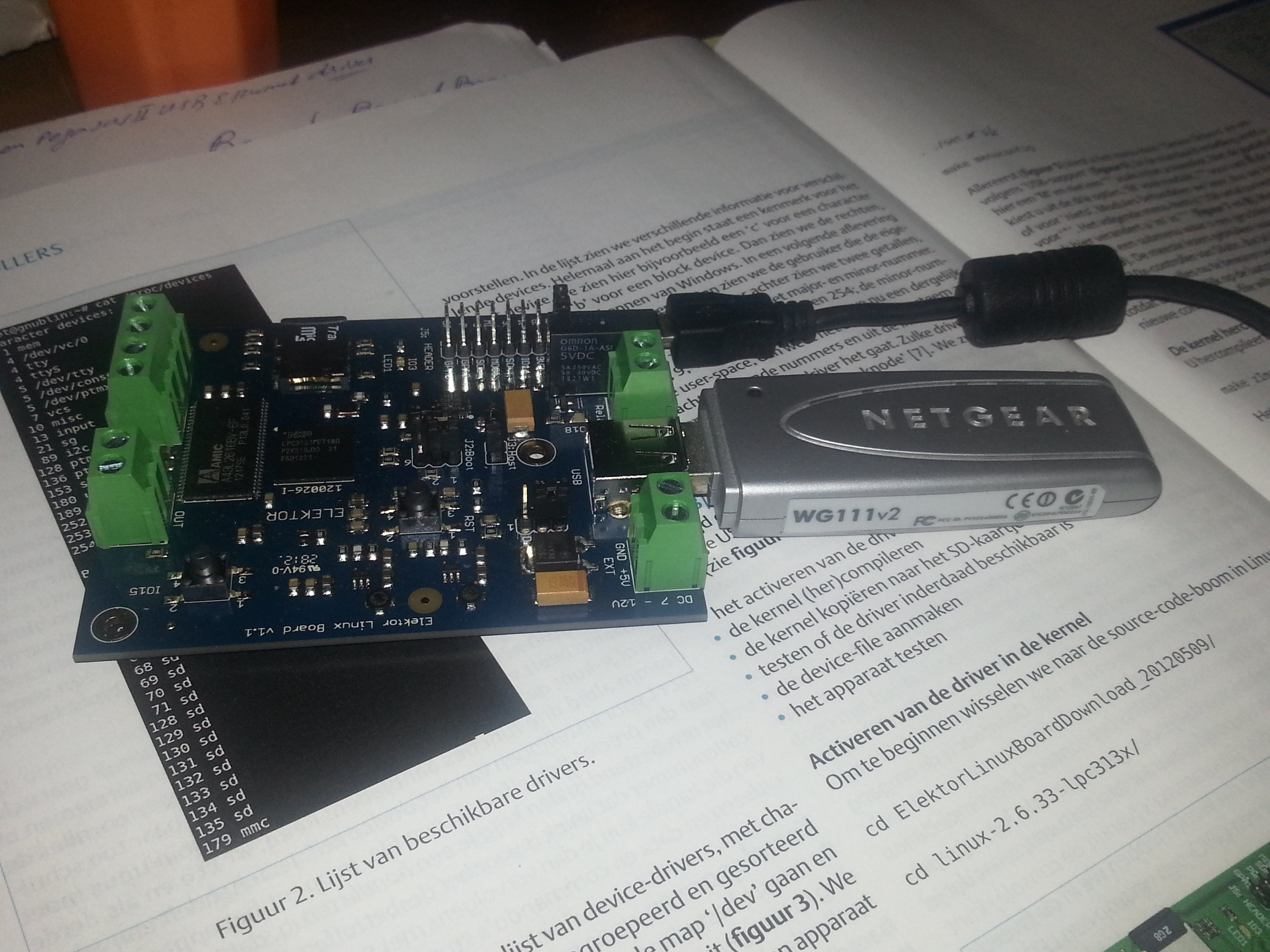
- cas55
- Posts: 59
- Joined: Thu Jan 02, 2014 3:41 pm
by jippie » Wed Oct 03, 2012 12:00 am
Handigst is om een heleboel modules gewoon als (M)odule te enable'en in de kernel configuratie en de hele handel te installeren. Vervolgens kun je booten en je hardware inpluggen. De modules die dan geladen worden (sudo lsmod) die laat je aan staan in je kernel config en de rest gooi je er (al dan niet) uit.
Zo lang je ruimte genoeg hebt op je geheugenkaartje, zou ik vooral niet te zuinig aan doen met modules. Ze zijn er sneller uit gehaald dan dat je de juiste (uitputtend testend) gevonden hebt. Bovendien loop je grote kans dat je voor elk stukje hardware weer opnieuw moet beginnen met zoeken.
Zo lang je ruimte genoeg hebt op je geheugenkaartje, zou ik vooral niet te zuinig aan doen met modules. Ze zijn er sneller uit gehaald dan dat je de juiste (uitputtend testend) gevonden hebt. Bovendien loop je grote kans dat je voor elk stukje hardware weer opnieuw moet beginnen met zoeken.
- jippie
- Posts: 342
- Joined: Thu Jan 02, 2014 3:28 pm
by cas55 » Wed Oct 03, 2012 12:00 am
He bedankt, maar ik probeerde het gewoon selectief. Ik kon die rotte RealTek RTL8187L maar niet vinden in de Kernel Configuration menu.
wel bv dit
http://linux-wless.passys.nl/language/latest_news.english.php
The Netgear WG111 v2 USB card, contains a Realtek chipset. The card works with linux, but you need a 2.6.x kernel! Before you can use this card, you need to disable the IEEE80211 framework that comes with the kernel. The driver comes with an own IEEE80211 Framework that is not compatible with the one in the kernel.
Take care to load the modules in the correct order, otherwise the card wont work:
ieee80211_crypt_rtl
ieee80211_crypt_wep_rtl
ieee80211_crypt_tkip_rtl
ieee80211_crypt_ccmp_rtl
ieee80211_rtl
r8187
Maar dat gaf meer puzzels dan mij lief was. Uiteindelijk vond ik dit via het engelse forum:
http://www.elektor.com/forum/elektor-forums/fields-of-interest/microcontrollers-embedded/embedded-linux.2148991.lynkx?highlight=WLAN&pageStart=101 op page 6 was een clou hoe de driver te vinden:
Kernel v2.6.33 Configuration
---> Device Drivers
---> Wireless LAN
---> Network device drivers
---> Device drivers
Ik loop nu wel weer vast. Ik kan nu dus inloggen met:
sudo ssh 192.168.0.184 -l root
(192.168.0.184 is toegekend nadat ik eerst was ingelogd op mijn Elektor boardje en daar dit heb ingegeven:
Ik weet even niet hoe ik deze error kan verhelpen.
Maar ik baal nu een beetje dat ik niet zoals bij de BeagleBone de g++ compiler kan installeren zoals in http://www.youtube.com/watch?v=vFv_-ykLppo
Hoe nu verder?
wel bv dit
http://linux-wless.passys.nl/language/latest_news.english.php
The Netgear WG111 v2 USB card, contains a Realtek chipset. The card works with linux, but you need a 2.6.x kernel! Before you can use this card, you need to disable the IEEE80211 framework that comes with the kernel. The driver comes with an own IEEE80211 Framework that is not compatible with the one in the kernel.
Take care to load the modules in the correct order, otherwise the card wont work:
ieee80211_crypt_rtl
ieee80211_crypt_wep_rtl
ieee80211_crypt_tkip_rtl
ieee80211_crypt_ccmp_rtl
ieee80211_rtl
r8187
Maar dat gaf meer puzzels dan mij lief was. Uiteindelijk vond ik dit via het engelse forum:
http://www.elektor.com/forum/elektor-forums/fields-of-interest/microcontrollers-embedded/embedded-linux.2148991.lynkx?highlight=WLAN&pageStart=101 op page 6 was een clou hoe de driver te vinden:
Kernel v2.6.33 Configuration
---> Device Drivers
---> Wireless LAN
---> Network device drivers
---> Device drivers
Ik loop nu wel weer vast. Ik kan nu dus inloggen met:
sudo ssh 192.168.0.184 -l root
(192.168.0.184 is toegekend nadat ik eerst was ingelogd op mijn Elektor boardje en daar dit heb ingegeven:
root@gnublin:~# ifup wlan0udhcpc (v1.17.3) startedmmcblk0: retrying using single block readSetting IP address 0.0.0.0 on wlan0Sending discover...Sending discover...Sending select for 192.168.0.184...Lease of 192.168.0.184 obtained, lease time 86400Setting IP address 192.168.0.184 on wlan0Deleting routersAdding router 192.168.0.1Recreating etc/resolv.conf Adding DNS server 192.168.0.1mmcblk0: error -115 sending stop command, resposne 0xc00, card status 0xe00mmcblk0: error -115 sending stop command, resposne 0xc00, card status 0xe00root@gnublin:~# mmcblk0: error -115 sending stop command, resposne 0xc00, card status 0xe00root@gnublin:~# ifconfig wlan0 uproot@gnublin:~#
Ik weet even niet hoe ik deze error kan verhelpen.
Maar ik baal nu een beetje dat ik niet zoals bij de BeagleBone de g++ compiler kan installeren zoals in http://www.youtube.com/watch?v=vFv_-ykLppo
Hoe nu verder?
root@gnublin:~# dmesg | grep mmcblkbus: mmc': add driver mmcblkWaiting for root device /dev/mmcblk0p1...bus: 'mmc': driver_probe_device: matched device mmc0:0002 with driver mmcblkbus: 'mmc': really_probe: probing driver mmcblk with device mmc0:0002mmcblk0: mmc0:0002 00000 1.90 GiB device: 'mmcblk0': device_addPM: Adding info for No Bus:mmcblk0 mmcblk0: p1 p2device: 'mmcblk0p1': device_addPM: Adding info for No Bus:mmcblk0p1device: 'mmcblk0p2': device_addPM: Adding info for No Bus:mmcblk0p2driver: 'mmc0:0002': driver_bound: bound to device 'mmcblk'bus: 'mmc': really_probe: bound device mmc0:0002 to driver mmcblkEXT2-fs (mmcblk0p1): warning: mounting unchecked fs, running e2fsck is recommendedmmcblk0: retrying using single block readmmcblk0: error -115 sending stop command, response 0xc00, card status 0xe00mmcblk0: error -115 sending stop command, response 0xc00, card status 0xe00mmcblk0: error -115 sending stop command, response 0xc00, card status 0xe00mmcblk0: error -115 sending stop command, response 0xc00, card status 0xe00mmcblk0: error -115 sending stop command, response 0xc00, card status 0xe00mmcblk0: error -115 sending stop command, response 0xc00, card status 0xe00mmcblk0: error -115 sending stop command, response 0xc00, card status 0xe00mmcblk0: error -115 sending stop command, response 0xc00, card status 0xe00mmcblk0: error -115 sending stop command, response 0xc00, card status 0xe00mmcblk0: error -115 sending stop command, response 0xc00, card status 0xe00mmcblk0: error -115 sending stop command, response 0xc00, card status 0xe00mmcblk0: error -115 sending stop command, response 0xc00, card status 0xe00mmcblk0: error -115 sending stop command, response 0xc00, card status 0xe00mmcblk0: error -115 sending stop command, response 0xc00, card status 0xe00mmcblk0: error -115 sending stop command, response 0xc00, card status 0xe00mmcblk0: error -115 sending stop command, response 0xc00, card status 0xe00root@gnublin:~# lsusb'
- cas55
- Posts: 59
- Joined: Thu Jan 02, 2014 3:41 pm
by jippie » Thu Oct 04, 2012 12:00 am
Voor wat het waard is, het heeft niet met je netwerk interface (NIC) te maken, maar met je memory card. Ik zag op Internet de foutmelding in veelvoud voorbij komen, dus Google is je vriend.
Het zou mij niet verbazen als het te maken heeft met het feit dat je een ander memory kaartje gebruikt dan de auteur (herinner je het geneuzel dat verschillende mensen hadden om het image op het kaartje te zetten omdat de omvang niet gelijk is?). Mij viel sowieso op dat in het card image de lost+found folder niet leeg is. Dat betekent dat het filesystem stuk (geweest) is. Misschien staat er toch nog ergens een pointertje waar de MCC driver niet tegen kan.
Het zou mij niet verbazen als het te maken heeft met het feit dat je een ander memory kaartje gebruikt dan de auteur (herinner je het geneuzel dat verschillende mensen hadden om het image op het kaartje te zetten omdat de omvang niet gelijk is?). Mij viel sowieso op dat in het card image de lost+found folder niet leeg is. Dat betekent dat het filesystem stuk (geweest) is. Misschien staat er toch nog ergens een pointertje waar de MCC driver niet tegen kan.
- jippie
- Posts: 342
- Joined: Thu Jan 02, 2014 3:28 pm
by cas55 » Sat Oct 06, 2012 12:00 am
De MCC foutmelding is niet meer te zien als je via ssh een terminal naar de ELB opent. Er is dus een verschil tussen de connectie via USB + picocom (wel de fout melding) en de ssh verbinding via WiFi.
Nu vraag ik mij af of je via de ssh verbinding een e2fsck command kan doen op mmcblk0p1.
Alleen als ik probeer dit te mounten dan krijg ik de volgende error
Ik ga maar een ander SD-cardje maken dan kan ik dmv swappen van het SD-cardje proberen de error -115 stop command fouten op te vangen. Trouwens met google search lijkt (voor mij) een andere oorzaakt mogelijk te zijn. Dit zou met de kwaliteit van de SD-card (timing) te maken te hebben.
Wat denken jullie van de volgende refs?
https://groups.google.com/forum/?fromgroups=#!topic/beagleboard/AINyT_flTFg
en
http://www.sakoman.com/cgi-bin/gitweb.cgi?p=linux-omap-2.6.git;a=commitdiff;h=381b62d716a8568d4210c5aa80d3dc0b5e0cdd6b
Het is een 2Gb SD card van Transcent (nog geen class indicatie). Er wordt ook de indruk gewekt dat een snellere Card minder problemen onder vindt. Ik vraag mij af of dit inderdaad zo is.
root@gnublin:~# mountrootfs on / type rootfs (rw)/dev/root on / type ext2 (rw,relatime,errors=continue)proc on /proc type proc (rw,relatime)sysfs on /sys type sysfs (rw,relatime)devpts on /dev/pts type devpts (rw,relatime,gid=5,mode=620)usbfs on /proc/bus/usb type usbfs (rw,relatime,devgid=14,devmode=660)tmpfs on /var/volatile type tmpfs (rw,relatime)tmpfs on /media/ram type tmpfs (rw,relatime)
Nu vraag ik mij af of je via de ssh verbinding een e2fsck command kan doen op mmcblk0p1.
Alleen als ik probeer dit te mounten dan krijg ik de volgende error
root@gnublin:~# mount /dev/mmcblk0p1 /mnt/tmp/mount: you must specify the filesystem typeroot@gnublin:~# ls -l /mnt/tmp/ls: cannot access /mnt/tmp/: No such file or directory
Ik ga maar een ander SD-cardje maken dan kan ik dmv swappen van het SD-cardje proberen de error -115 stop command fouten op te vangen. Trouwens met google search lijkt (voor mij) een andere oorzaakt mogelijk te zijn. Dit zou met de kwaliteit van de SD-card (timing) te maken te hebben.
Wat denken jullie van de volgende refs?
https://groups.google.com/forum/?fromgroups=#!topic/beagleboard/AINyT_flTFg
en
http://www.sakoman.com/cgi-bin/gitweb.cgi?p=linux-omap-2.6.git;a=commitdiff;h=381b62d716a8568d4210c5aa80d3dc0b5e0cdd6b
Het is een 2Gb SD card van Transcent (nog geen class indicatie). Er wordt ook de indruk gewekt dat een snellere Card minder problemen onder vindt. Ik vraag mij af of dit inderdaad zo is.
- cas55
- Posts: 59
- Joined: Thu Jan 02, 2014 3:41 pm
by jippie » Sun Oct 07, 2012 12:00 am
Kennelijk worden kernel messages naar je console gestuurd (redelijk gebruikelijk in Linux-land). Met de 'USB + picocom' log je aan op het 'fysieke' console, en met SSH log je aan op een tty-sessie. Uiteindelijk maakt het niets uit, ze werken beide precies hetzelfde, alleen op je 'fysieke console' komen er af en toe wat systeemmeldingen doorheen. Waarschijnlijk staan dezelfde meldingen in `dmesg` of in `tail /var/log/syslog`. Voor het 'fysieke´ console zijn minder resources nodig, veel eerder in het bootproces kan daar al gebruik van gemaakt worden. De ssh-methode werkt pas als de hardware volledig geïnitialiseerd is, TCP/IP-stack geladen, ssh-daemon gestart ...
Via beiden kun je een fsck doen, het resultaat is exact hetzelfde.
Als het systeem goed draait, heb je het 'fysieke' console eigenlijk alleen nodig wanneer je het operating system gaat patchen, je kunt jezelf dan niet veroorloven dat je de verbinding met het systeem kwijt raakt. Meestal werkt aanloggen via SSH comfortabeler voor regulier werk.
Om een filesytem te mounten moet je een bestaand mountpoint hebben. Tijdens het booten van de meeste Linux-distributies wordt /tmp geschoond (geen idee of dit bordje het ook doet). Als je voorheen dus een mountpoint (=lege directory) gemaakt hebt dan is die nu waarschijnlijk weg en moet je hem opnieuw aanmaken. Persoonlijk zou ik overigens voor /tmp/mnt kiezen en geen rommel in /mnt zetten. /mnt is in de regel leeg en vaak ongebruikt. Mnt kan meestal prima gebruikt worden als mount point, maar als je niet de enige op het systeeem bent, dan heb je natuurlijk nooit de garantie dat /mnt ongebruikt is. Wanneer een ander proces al een filesystem gemount had op /mnt kan er van alles mis gaan en crashen is niet uitgesloten.
Via beiden kun je een fsck doen, het resultaat is exact hetzelfde.
Als het systeem goed draait, heb je het 'fysieke' console eigenlijk alleen nodig wanneer je het operating system gaat patchen, je kunt jezelf dan niet veroorloven dat je de verbinding met het systeem kwijt raakt. Meestal werkt aanloggen via SSH comfortabeler voor regulier werk.
Om een filesytem te mounten moet je een bestaand mountpoint hebben. Tijdens het booten van de meeste Linux-distributies wordt /tmp geschoond (geen idee of dit bordje het ook doet). Als je voorheen dus een mountpoint (=lege directory) gemaakt hebt dan is die nu waarschijnlijk weg en moet je hem opnieuw aanmaken. Persoonlijk zou ik overigens voor /tmp/mnt kiezen en geen rommel in /mnt zetten. /mnt is in de regel leeg en vaak ongebruikt. Mnt kan meestal prima gebruikt worden als mount point, maar als je niet de enige op het systeeem bent, dan heb je natuurlijk nooit de garantie dat /mnt ongebruikt is. Wanneer een ander proces al een filesystem gemount had op /mnt kan er van alles mis gaan en crashen is niet uitgesloten.
- jippie
- Posts: 342
- Joined: Thu Jan 02, 2014 3:28 pm
8 posts
• Page 1 of 1
Return to Aan de slag met Embedded Linux
Who is online
Users browsing this forum: No registered users and 1 guest