Hello,
I need some help with the new upgrade of the SD card of my GNUBLIN. I have the old Elektor Gnublin with 8MB memory and have follow the instruction from http://en.gnublin.org/index.php/GNUBLIN-Elektor to upgrade the SD card. After having executed the below command on my Linux PC, I have ût back the SD card in the Gnublin and power it up, but it does not boot any more. It hangs at "booting kernel at 0x30008000..."
sudo tar xvzf Gnublin_Elektor_Debian_8MB_rootfs.tar.gz -C /media/Gnublin
Any idea whats going wrong?'

The Elektor Forum will close. See also this link. From Friday March 1st it is no longer possible to log in to the forum. However, the content of the forum will remain visible until the end of March. As of April 1st the forum will definitely go off the air.
Elektor Gnublin new Linux distribution problem
14 posts
• Page 1 of 2 • 1, 2
 by sauterbe » Fri Nov 01, 2013 12:00 am
Perhaps you have the wrong bootloader? Have used the 8MB loader? Or what sd card do you use? Is this the original one?
You can create an sd card with 8 mb with the gnublin installer. You can use the live cd:
http://gnublin.embedded-projects.net/live-cd/
After this you can use the debian or you can extract you rootfilesystem.
You can create an sd card with 8 mb with the gnublin installer. You can use the live cd:
http://gnublin.embedded-projects.net/live-cd/
After this you can use the debian or you can extract you rootfilesystem.
- sauterbe
- Posts: 7
- Joined: Thu Jan 02, 2014 10:43 am
by chrpaq » Fri Nov 01, 2013 12:00 am
I have started from my original Elektor SD card on wich I have already put some customization: updated kernel to handle USB Dlink ethernet adapter, new users, debugger, code, driver for RTC of the expansion card...
I took a backup of this card using dd command and copy back the backup on a new SD card same capacity (2Gb). I have tested the newly created card, and all ok. Then I have updated the card as mentioned above and as recommended in the Wiki.
So I did not change the structure of teh partition, and did not update the loader.
Did I miss something?
If I create a brand new card from the Gnublin-Installer, it works, but I loose then what I have put on the other card.
I took a backup of this card using dd command and copy back the backup on a new SD card same capacity (2Gb). I have tested the newly created card, and all ok. Then I have updated the card as mentioned above and as recommended in the Wiki.
So I did not change the structure of teh partition, and did not update the loader.
Did I miss something?
If I create a brand new card from the Gnublin-Installer, it works, but I loose then what I have put on the other card.
- chrpaq
- Posts: 4
- Joined: Thu Jan 02, 2014 10:43 am
by ag » Sat Nov 02, 2013 12:00 am
Hi chrpaq,
I made a new SD card using the gnublin-installer and got the same problem:
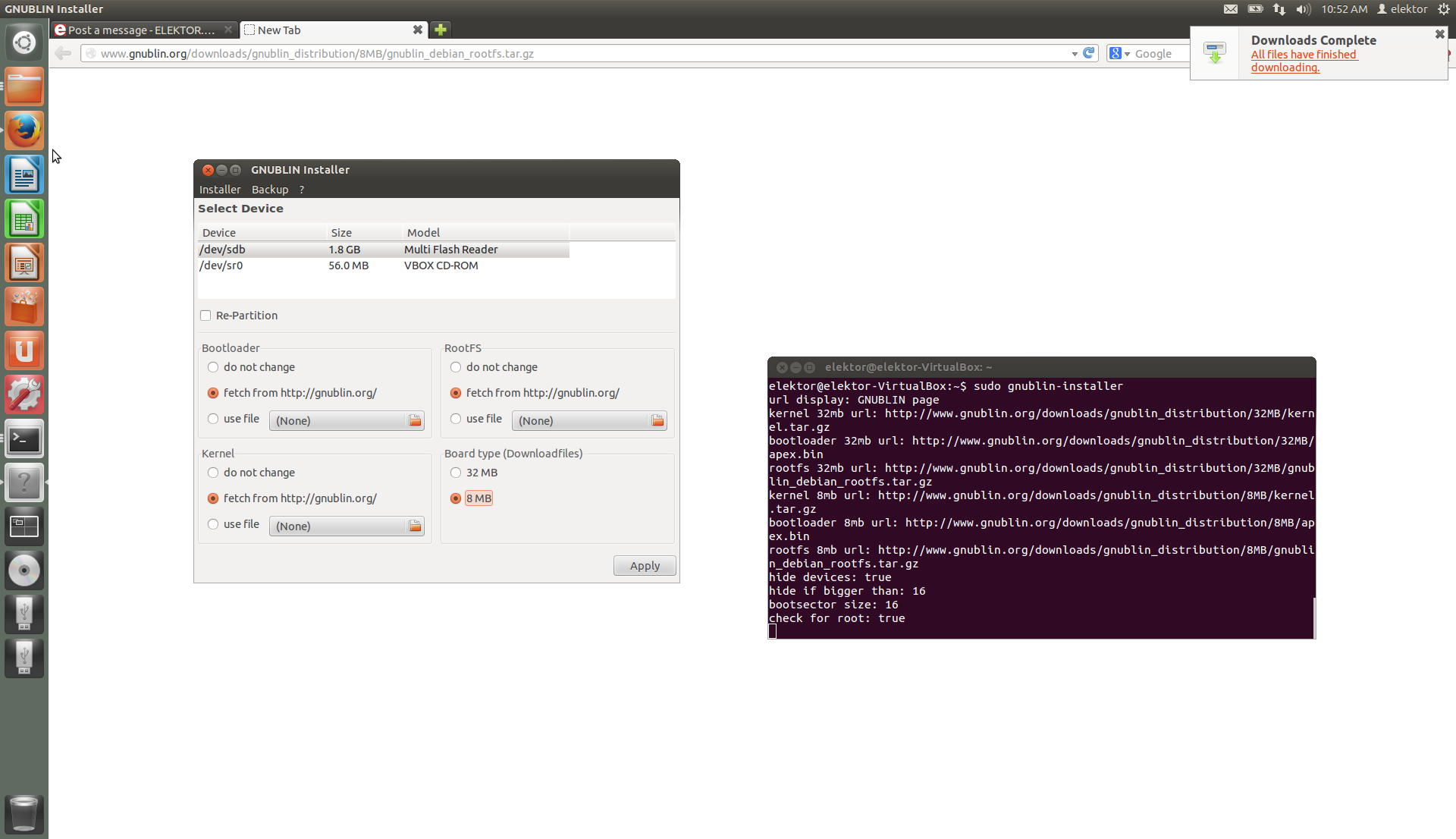
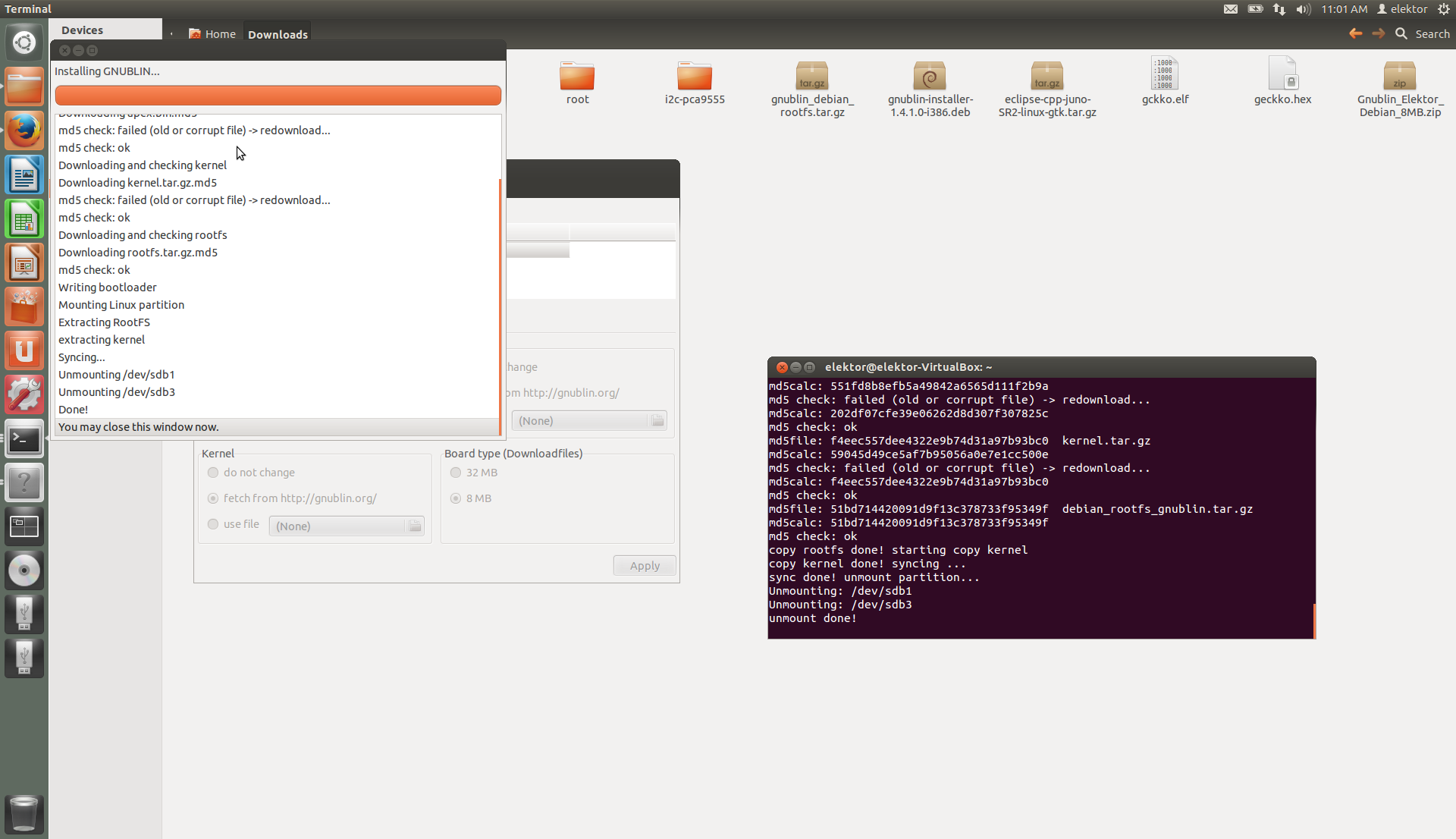
The target SD card was also the original 2GB card from Elektor. So I thought I may have done something wrong (acutally, I think I had originally planned to test the card in my new 32MB version of the elektor board, but I am not sure) and decided to repeat the process of creating a new SD Card using gnbulin-installer (see screen shots below).
This time the SD card booted normally into the new debian system, so I halted the gnublin so as to use the newly created SD card as a target to test your scenario. However, when I try to download the 8MB rootfs zip file, I get the response "forbidden":
Same occurs when I visit the gnublin site and attempt to download via browser. Registering as a member also does not help. So, my best guess is that this process is currently "under construction", possibly due to the problem you have cited.
One point that I seem to misunderstand: are you only wanting to convert your existing "old" file system to ext4 ( remaining with "old" rootfs to keep your "customiziation")? If so, would you not want to use the gnublin-installer for that, using the appropiate radio button selections? If, however, you are wanting to convert to the new debian rootfs AND still keep your "customization", does that not mean you would have to take another approach? I believe that using the command line referenced would simply overwrite your entire file system, including "customization", would it not?
Best regards,
Ag
I made a new SD card using the gnublin-installer and got the same problem:
APEX Boot Loader 1.6.8-ep -- Copyright (c) 2004-2008 Marc Singer
compiled for Embedded Projects EPLPC3131 on 2013.Jul.22-18:49:43
APEX comes with ABSOLUTELY NO WARRANTY. It is free software and
you are welcome to redistribute it under certain circumstances.
For details, refer to the file COPYING in the program source.
apex => mem:0x11029000+0xd8cc (55500 bytes)
env => lnand:512k+256k (bad-region)
Use the command 'help help' to get started.
# wait 2
# copy ext2://1/zImage 0x30008000
2710604 bytes transferred
# boot
ARCH_ID: 9998 (0x270e)
ATAG_HEADER
ATAG_MEM: start 0x30000000 size 0x01000000
ATAG_CMDLINE: (72 bytes) 'console=ttyS0,115200n8 root=/dev/mmcblk0p3 rw rootfstype=ext4 rootwait '
ATAG_END
Booting kernel at 0x30008000...
The target SD card was also the original 2GB card from Elektor. So I thought I may have done something wrong (acutally, I think I had originally planned to test the card in my new 32MB version of the elektor board, but I am not sure) and decided to repeat the process of creating a new SD Card using gnbulin-installer (see screen shots below).
This time the SD card booted normally into the new debian system, so I halted the gnublin so as to use the newly created SD card as a target to test your scenario. However, when I try to download the 8MB rootfs zip file, I get the response "forbidden":
elektor@elektor-VirtualBox:~$
elektor@elektor-VirtualBox:~$ cd /
elektor@elektor-VirtualBox:/$ cd /media
elektor@elektor-VirtualBox:/media$ ls
cdrom Gnublin Kernel VBOXADDITIONS_4.2.18_88780
elektor@elektor-VirtualBox:/media$ cd
elektor@elektor-VirtualBox:~$ wget http://www.gnublin.org/downloads/Gnublin_Elektor_Debian_8MB_rootfs.tar.gz
--2013-11-02 11:19:02-- http://www.gnublin.org/downloads/Gnublin_Elektor_Debian_8MB_rootfs.tar.gz
Resolving www.gnublin.org (www.gnublin.org)... 46.163.117.240
Connecting to www.gnublin.org (www.gnublin.org)|46.163.117.240|:80... connected.
HTTP request sent, awaiting response... 403 Forbidden
2013-11-02 11:19:02 ERROR 403: Forbidden.
elektor@elektor-VirtualBox:~$
Same occurs when I visit the gnublin site and attempt to download via browser. Registering as a member also does not help. So, my best guess is that this process is currently "under construction", possibly due to the problem you have cited.
One point that I seem to misunderstand: are you only wanting to convert your existing "old" file system to ext4 ( remaining with "old" rootfs to keep your "customiziation")? If so, would you not want to use the gnublin-installer for that, using the appropiate radio button selections? If, however, you are wanting to convert to the new debian rootfs AND still keep your "customization", does that not mean you would have to take another approach? I believe that using the command line referenced would simply overwrite your entire file system, including "customization", would it not?
Best regards,
Ag
- Attachments
-
-
Ag
- ag
- Posts: 533
- Joined: Thu Jan 02, 2014 10:37 am
by ag » Sun Nov 03, 2013 12:00 am
Oh, and by the way: be very carefull when using gnublin-installer. Today I discovered that using radio button "use file" for loading a kernel from your file system does not work. Instead, it loads a kernel and modules from gnublin.org!
Ag
Ag
Ag
- ag
- Posts: 533
- Joined: Thu Jan 02, 2014 10:37 am
by chrpaq » Mon Nov 04, 2013 12:00 am
In fact what I want is to convert my old EXT2 sd card to EXT4 FS to have a more robust FS. What are the correct options to select in the gnublin-installer to do this.
About the Gnublin_Elektor_Debian_8MB_rootfs.tar.gz, I also got the forbidden access reply, and I have extracted from the full image as described on the same wiki page:
------------------
The following describes how the file system is extracted from the .img to the PC and then copy it to the SD card.
wget http://www.gnublin.org/downloads/Gnublin_Elektor_Debian_8MB.zip
unzip Gnublin_Elektor_Debian_8MB.zip
sudo losetup /dev/loop0 /tmp/Gnublin_Elektor_Debian_8MB.img -o $((32130 * 512))
cd /media/Gnublin/
sudo tar -zc -f /tmp/Gnublin_Elektor_Debian_8MB_rootfs.tar.gz *
sudo losetup -d /dev/loop0
Then plug in the SD-Card and mount it. Now extract the filesystem.
sudo tar xvzf /tmp/Gnublin_Elektor_Debian_8MB_rootfs.tar.gz -C /media/Gnublin
------------------------------
About the Gnublin_Elektor_Debian_8MB_rootfs.tar.gz, I also got the forbidden access reply, and I have extracted from the full image as described on the same wiki page:
------------------
The following describes how the file system is extracted from the .img to the PC and then copy it to the SD card.
wget http://www.gnublin.org/downloads/Gnublin_Elektor_Debian_8MB.zip
unzip Gnublin_Elektor_Debian_8MB.zip
sudo losetup /dev/loop0 /tmp/Gnublin_Elektor_Debian_8MB.img -o $((32130 * 512))
cd /media/Gnublin/
sudo tar -zc -f /tmp/Gnublin_Elektor_Debian_8MB_rootfs.tar.gz *
sudo losetup -d /dev/loop0
Then plug in the SD-Card and mount it. Now extract the filesystem.
sudo tar xvzf /tmp/Gnublin_Elektor_Debian_8MB_rootfs.tar.gz -C /media/Gnublin
------------------------------
- chrpaq
- Posts: 4
- Joined: Thu Jan 02, 2014 10:43 am
by michaelfleming » Mon Dec 16, 2013 12:00 am
Hi I have tried to install the updated kernel as described in jan/feb 2013 issue of elektor everthing seems to go ok. I can boot the new kernel but then it shuts down with BUG SOFT LOCKUP. Can anybody help i am nearly ready to give up on this .
Thanks in advance mikefl2
Thanks in advance mikefl2
- michaelfleming
- Posts: 3
- Joined: Thu Jan 02, 2014 10:43 am
14 posts
• Page 1 of 2 • 1, 2
Return to Microcontrollers & Embedded
Who is online
Users browsing this forum: No registered users and 2 guests
